KNOW WHAT
IS INSIDE.
Understand the layers.
Find the component. Make the right repair.
An interactive anatomy atlas for your console, controller and headset. Start with the model, investigate the symptom, then follow the right component notes.
Open the workbench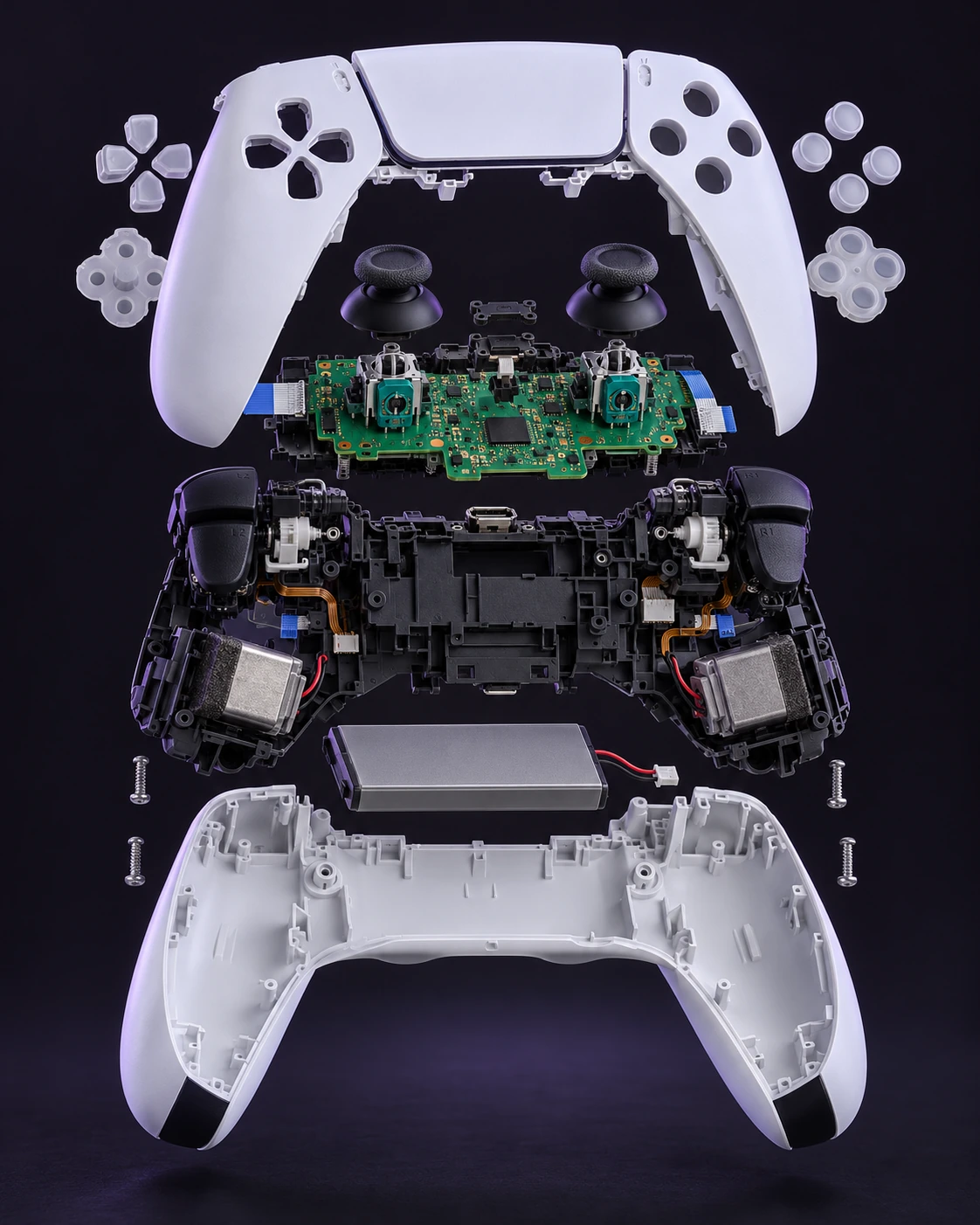
Your hardware.
Your next battlefield.
Explore source-backed gaming coverage alongside the component library.
Maps, secrets, weapons, loadout planning and official patch intelligence.
Open the field guide ↗ROCKSTAR GAMESGTA VIVerified news, official videos and documented guides for Leonida.
Explore GTA VI ↗Original Disc Edition · CFI-10xxA
Read the CFI model on the console label before opening. These internal guides target the 2020 Disc Edition (CFI-10xxA).
CFI-11xx, CFI-12xx, Slim CFI-20xx and Pro CFI-70xx have different internal layouts. Do not transfer screw maps or drive procedures between revisions. Sony’s M.2 reference includes separate model instructions.
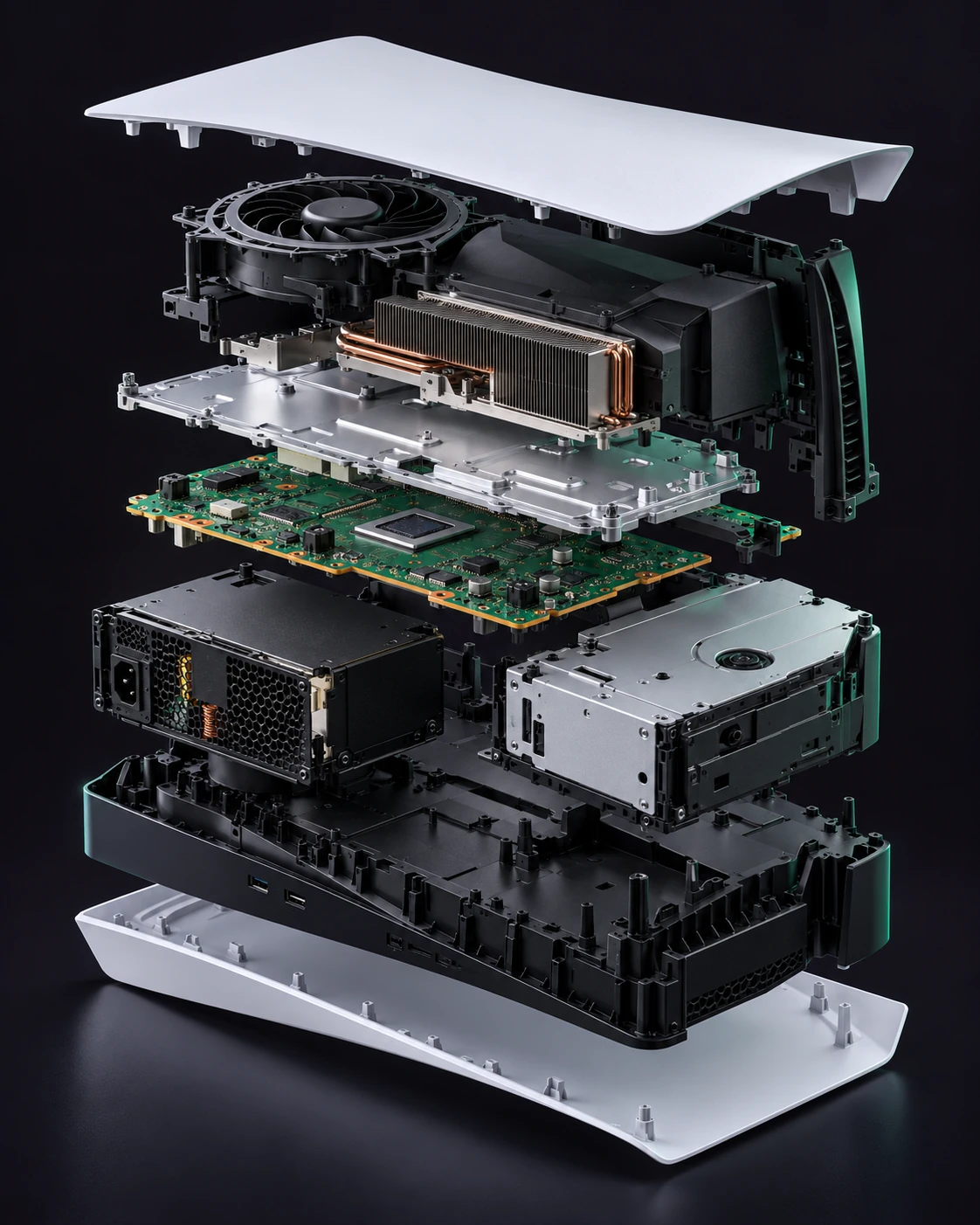
AI-generated product illustration. Internal shapes, positions and fasteners may differ from your actual device.
View photographic technical referencesOuter covers
Remove the two exterior panels without opening the electrical assemblies.
Signs to investigate
- Cracked panel
- Broken mounting tabs
Prepare your bench
- Soft work mat
Component procedure
- 01
Fully shut down, unplug every cable and let the console cool. Remove the base and place the console on a soft flat surface.
- 02
Match the CFI-1000 orientation in Sony’s cover reference. Release the indicated corner slightly, then slide the panel along its hooks rather than bending it outward.
- 03
Inspect the hooks and clear loose debris. Align a matching panel with the hooks and slide it until seated; repeat for the other side if needed.
Stop if the panel resists sliding; confirm orientation instead of forcing the hooks.
Both panels sit flush and remain secure when the console is repositioned.
Restore all covers, shielding and cable routing before powered tests. Keep each screw in its original position. If fit or resistance changes, reopen and inspect rather than tightening harder.
Technical reference & evidence
Original notes by VICEPULSE, checked against the reference below. These are concise component notes; use the matched photographic reference for exact fastener locations and connector details. The AI-generated product render is illustrative, not a service drawing.
PlayStation Support ↗Source-checked on 31 October 2026. VICEPULSE has not bench-tested this procedure. Internal part fit must be verified against your actual revision.
A better repair
starts with a better diagnosis.
Try cables, settings and external checks first. An identical symptom can come from different components.
Disconnect external power before opening. Batteries need isolation before electrical work. A damaged lithium pack and an enclosed mains supply require specialist handling.
Choose a component to see its access guides, the tools to prepare, a concise procedure and the final checks. Specialist cards provide diagnosis and a service route rather than an unverified DIY teardown.
Every component has a place.
Coverage is limited to the named reference revisions. Browse components by function. The illustrative renders do not specify screw locations or dismantling order.
From the outer panels to the thermal core. CFI-11xx, CFI-12xx, Slim CFI-20xx and Pro CFI-70xx have different internal layouts. Do not transfer screw maps or drive procedures between revisions. Sony’s M.2 reference includes separate model instructions.
Outer covers
Remove the two exterior panels without opening the electrical assemblies.
Explore component ↗Exterior / CareBase and stand screw
Remove, inspect and refit the original console base.
Explore component ↗Service access / CareM.2 expansion SSD
Install or remove the expansion drive; this is separate from the soldered internal storage.
Explore component ↗Service access / RepairCooling fan
Remove the original-model fan for cleaning or a matching replacement.
Explore component ↗Front controls / RepairFront USB board
Replace the front USB assembly after ruling out cable and device faults.
Explore component ↗Front controls / RepairPower and eject board
Service the separate front-button board on the original Disc Edition.
Explore component ↗Status-light board
Service the lighting assembly after checking whether the console otherwise operates.
Explore component ↗Drive & power / SpecialistDisc-drive mechanism and laser
A mechanical or optical repair must preserve the original paired drive electronics.
Explore component ↗Drive & power / SpecialistEnclosed power-supply module
Replace the enclosed module only after a technician confirms the power fault.
Explore component ↗Logic board / SpecialistMainboard, HDMI and onboard storage
HDMI and internal flash are board-level components, not plug-in replacement modules.
Explore component ↗Thermal core / SpecialistHeatsink and thermal interface
The processor uses a conductive liquid-metal interface beneath the cooling assembly.
Explore component ↗Beyond the shell. Into every input. BDM-020 and later controllers, and DualSense Edge, use different layouts. A removable rubber stick cap is not the soldered joystick module.
Centre trim
Release the cosmetic trim before deeper access.
Explore component ↗Shell & trim / CareL1 and R1 bumpers
Remove the external shoulder-button caps.
Explore component ↗Rear shell / RepairRear shell
Open the back cover without tearing its clips.
Explore component ↗Power / RepairBattery pack
Replace the plug-connected battery after testing the charging cable.
Explore component ↗Inputs / RepairAnalog-stick caps
Replace the removable caps rather than the electrical joystick mechanism.
Explore component ↗Logic / SpecialistJoystick modules and drift
A drifting sensor module is soldered to the board; changing the cap will not fix it.
Explore component ↗Inputs / RepairButtons and silicone membranes
Service the D-pad, face buttons and their conductive silicone pads.
Explore component ↗Shell & trim / RepairFront shell
Transfer the complete button and touchpad layout into a matching shell.
Explore component ↗Built-in speaker
Service the small speaker and its pressure contacts.
Explore component ↗Midframe / RepairMicrophone assemblies
Service the microphone flex assemblies while preserving their routing.
Explore component ↗Inputs / RepairTouchpad assembly
Replace the touch surface, bracket and flex as a matched assembly.
Explore component ↗Midframe / RepairL2 and R2 trigger assemblies
Service a complete adaptive-trigger assembly rather than guessing at individual gears.
Explore component ↗Midframe / SpecialistHaptic actuators
The actuators are wired to the board and need soldered service.
Explore component ↗Logic / RepairLight diffuser
Replace the optical light guide when its plastic is damaged.
Explore component ↗Logic / SpecialistMainboard, USB-C and audio connection
Service the board and its connectors only after cable and software checks.
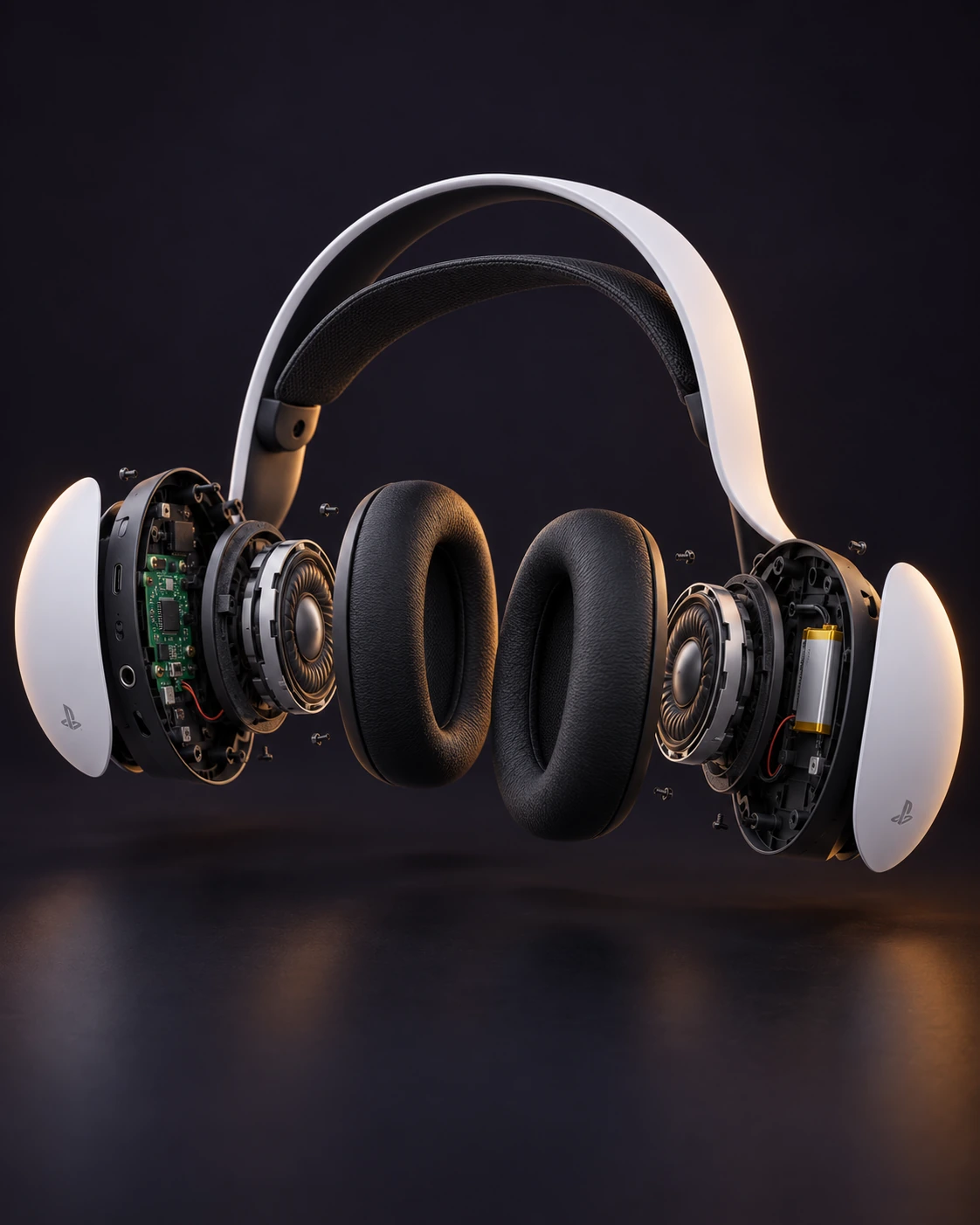
Explore component ↗Follow the sound. Find the fault. This is the PULSE 3D headset, not PULSE Elite CFI-ZWH2, the older Pulse Elite Edition or third-party headsets. Internal cards provide assessment routes where the available source is a teardown rather than a repair manual.
Ear cushions
Unclip the cushion frame and inspect the model label underneath.
Explore component ↗Comfort / RepairSuspension band and outer frame
Inspect comfort-band damage separately from the structural headband.
Explore component ↗Acoustic face / SpecialistLeft and right acoustic drivers
Check the acoustic path before internal driver work.
Explore component ↗Right earcup / SpecialistBattery and right-earcup interconnect
Separate charging faults from battery deterioration.
Explore component ↗Mainboard, USB-C and audio socket
Localise a port fault before board-level repair.
Explore component ↗Voice & controls / SpecialistMicrophones and control assembly
Rule out settings before opening the voice or button assemblies.
Explore component ↗Wireless link / CareWireless USB adapter
Reset the headset link before assuming the adapter needs replacement.
Explore component ↗Open with understanding.
Is every part a user-replaceable module?
No. External care, experienced repair and specialist service are labelled separately. A soldered port, analog sensor or processor is not a plug-in module. The PS5 M.2 expansion drive is separate from the console’s onboard storage.
Do these guides cover PS5 Slim, Pro or DualSense Edge?
No. The internal reference models are the original PS5 Disc Edition CFI-10xxA, DualSense V1 BDM-010 and PULSE 3D CFI-ZWH1. Match the revision rather than extrapolating from a similar-looking device.
Are the illustrations exact exploded service drawings?
They are AI-generated product illustrations with realistic materials and lighting, not 3D scans, measured CAD models or service drawings. Shapes and placement may differ from your actual device. Use the linked photographic references for real fasteners, connectors and repair details.
Can I purchase replacement parts here?
This section is an educational repair library. There are no replacement-part listings, affiliate links or checkout. Technical references point to documentation rather than a parts catalogue.